Build Block Craft
SENSPARKAdventure
3.5150.00 Reviews
- Version
- 2.4.2
- Installs
- 10.00M
- Age Rating
- Everyone
Screenshots
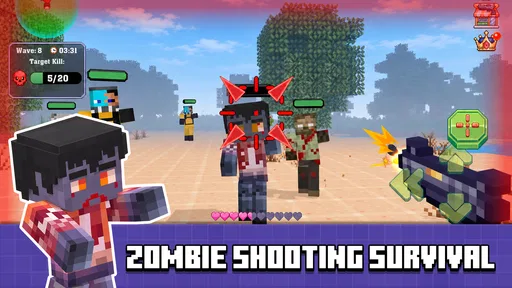
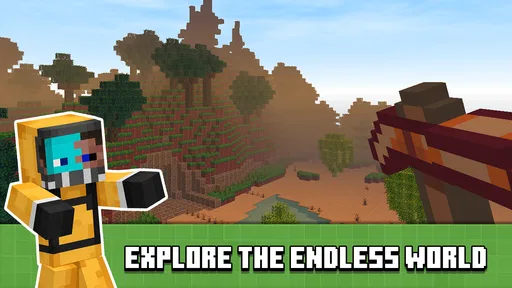


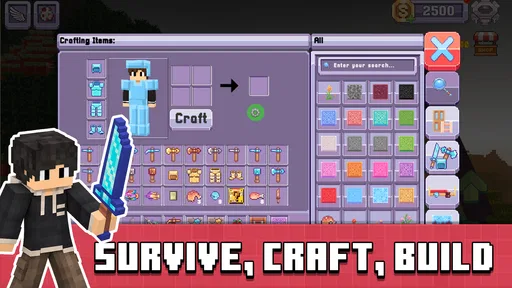
Our Review of Build Block Craft
 Analysis by Appyee
Build Block Craft is the kind of adventure game I open when I want to make something at my own pace rather than chase a strict mission or compete with other players. I spent time treating it as a building workspace first and a game second, and that is where it makes the most sense. The basic appeal is simple: place blocks, shape a space, change the surroundings, and gradually turn an empty area into something that feels personal. It is free to start, aimed at Everyone, and developed by SENSPARK, so it is clearly designed to be approachable rather than intimidating.
That easy entry is also the reason it has attracted a large audience, with more than ten million installs. The overall rating sits at 3.5 from roughly six thousand ratings, which tells me the experience is useful to many players but not universally smooth. My own view is similar: there is a pleasant creative loop here, especially for casual builders, but the game asks for patience when a project becomes detailed. It is better understood as a relaxed block-building playground than as a deep adventure campaign.
How I approach a new build
My first session with Build Block Craft was much better once I stopped trying to build a complete house immediately. I began with a small footprint, tested how placement and movement felt, and used that first structure to learn the rhythm of the controls. This matters because block games can look effortless in screenshots while feeling awkward when the camera, movement, and placement actions compete for space on a phone screen.
I recommend starting with a simple outline rather than decorating as you go. I place the corners first, fill the main surfaces, and only then decide where windows, entrances, paths, or raised sections should sit. This workflow reduces accidental changes and makes it easier to see whether the shape works before spending time on details. If I begin with tiny decorative choices, I often end up rebuilding the same wall several times.
A practical everyday use case is a short evening session. After work or school, I can spend a few minutes extending a garden, adding a small room, or improving a walkway without needing to remember a complicated objective. The game suits that stop-and-start habit because the creative goal can be as small as one finished corner. Players who prefer a calm activity on a phone will probably appreciate this more than people looking for constant action.
The first useful habit is to divide a project into visible stages. I think of them as layout, structure, decoration, and cleanup. During layout, I care only about proportions. During structure, I make the main forms readable from a distance. Decoration comes later, when I can judge whether details actually help. Cleanup is where I remove blocks that make entrances cramped or surfaces look unintentionally noisy.
This approach also helps answer an important question: is the game suitable for children? Its Everyone content rating makes it broadly accessible, and the building concept is easy to understand. Still, younger players may need guidance around optional purchases, because individual in-app items range from ten cents to nearly one hundred dollars. I would let a child explore the creative side only after checking the device’s purchase controls.
The controls reward deliberate movement
Touch controls are most comfortable when I make smaller movements than I initially expect. Sweeping across the screen quickly can move the view farther than intended, especially when I am trying to line up a block with an existing wall. I now use short camera adjustments, pause before placing, and check the edge of the structure from more than one angle. That small delay saves more time than rushing through a row.
For walls and floors, I work in repeatable passes. I complete one horizontal section, inspect it, and then continue rather than jumping between unrelated parts of the build. This makes mistakes easier to spot. If a row looks uneven, I know where to look instead of searching through the entire project. It is a modest technique, but it is one of the clearest differences between a frustrating session and a productive one.
I also avoid building directly against the maximum visual complexity I can manage. A design that looks impressive in a close view can become difficult to navigate once several layers, corners, and decorations overlap. Leaving a little breathing room around entrances and paths gives me better visibility and makes later edits less annoying. In a mobile game, readable space is often more valuable than squeezing in one more ornament.
Settings and device habits worth checking
Before starting a serious project, I check the available game settings and make the display comfortable for longer sessions. I look for options that affect sound, visual presentation, or control behavior, then test them in a small area rather than changing everything during a large build. The exact best setup depends on the phone, but the principle is consistent: remove distractions before beginning detailed placement.
Sound is worth adjusting according to how I play. If I am building while listening to something else, lowering game audio makes the session less tiring. If I need feedback from my actions, I keep enough volume to notice it. This is not a dramatic feature, but it changes whether the game feels relaxing or cluttered during a longer creative task.
I also pay attention to touch accuracy. A clean screen, a stable grip, and using the phone in the orientation that feels most natural can matter more than expected. I prefer supporting the device rather than holding it loosely with one hand while making precise placements with the other. That setup reduces accidental camera movement and gives me more control around corners.
The current version is 2.4.2, and the game requires Android 10 or newer. That makes the operating-system requirement important before downloading, especially if the phone is older. On a compatible device, I still recommend closing unnecessary apps when working on an ambitious build. I do not treat that as a guarantee of better performance, but it is a sensible preparation for any game that asks the phone to display a busy scene.
Another setting-related habit is to keep purchases separate from the creative decision itself. Because the game is free to download but offers optional items at several price points, I would never tap through a purchase simply to maintain momentum. I decide what I actually need first, then consider whether it improves the project enough to justify the cost. For many casual builds, patience and planning are more valuable than buying immediately.
Faster building patterns that actually help
The fastest pattern I found is not a secret shortcut; it is repetition. I choose one standard wall height, one doorway style, and one small set of materials for the first version of a structure. Once the shape is working, I vary those elements selectively. This keeps the build coherent and prevents me from spending the entire session deciding between tiny alternatives.
For larger areas, I use landmarks instead of trying to remember every coordinate or position. A distinctive entrance, a central path, or a taller section gives me a visual reference when I return to the project. This is especially useful on a phone, where navigating back to a specific corner can be slower than it would be with a mouse and keyboard. The trick is to make landmarks functional as well as decorative.
Repeating a pattern is another good way to make progress without making the result feel empty. I might use matching supports along a walkway, similar windows on one side of a building, or a consistent border around a garden. Repetition gives the eye a sense of order. I then break the pattern in one or two places so the project does not look mechanically copied.
A surprisingly effective workflow is to build from the outside inward. I establish the perimeter, then the major rooms or open spaces, and only afterward fill in the center. This prevents a common problem where a player creates a beautiful central feature but leaves no comfortable route around it. In an adventure setting, movement through the build matters almost as much as how it looks from above.
I also keep a “rough version” mindset. The first pass is allowed to be plain. If I try to make every block final, I become reluctant to experiment. When I treat the first arrangement as a sketch, I can remove a wall, widen a path, or change the proportions without feeling that time has been wasted. That is one of the strongest ways to get more creative value from the game without relying on purchases.
Where the experience becomes less comfortable
The game’s simplicity is both its strength and its boundary. Players who want a highly structured adventure with complex missions, deep character progression, or a strong narrative may find the building loop too open-ended. The freedom is enjoyable when I already have an idea, but it can feel directionless when I am waiting for the game to tell me what to do next.
It is also not my first choice when I want the precision of a desktop building tool. Touch input is convenient, but it is less forgiving for detailed alignment. Long walls and broad surfaces are manageable; tiny decorative arrangements require more concentration. I can work around that by using larger forms and checking angles often, but the limitation never completely disappears.
Another trade-off is the difference between a quick build and a polished build. A small shelter or simple landscape can be satisfying in one sitting. A detailed town takes more planning, more camera movement, and more willingness to correct mistakes. The game does not remove that creative labor. Its value comes from making the labor approachable on a mobile device, not from making complex construction effortless.
The purchase system is another reason I would set expectations early. Free access makes it easy to try the core experience, but the range of optional item prices means families and younger players should use purchase safeguards. I would recommend playing long enough to understand the normal building loop before deciding whether any paid item is useful. If the basic process already feels repetitive, spending more is unlikely to solve the underlying issue.
Players should also consider the kind of motivation they need. I enjoy self-directed projects, but someone who needs constant rewards may lose interest. In that case, a mission-driven adventure game or a more competitive building alternative may be a better fit. The absence of pressure is calming for me; for another player, it may feel like a lack of purpose.
How it compares with familiar alternatives
Compared with a traditional action-adventure game, this title gives me far more control over the setting and far less urgency. I am not opening it for combat tension or a dramatic story. I am opening it to shape a place. Compared with a dedicated sandbox game, it feels easier to approach casually, but it does not replace the depth that experienced players may expect from a larger creative system.
It also differs from a pure design or architecture app. The block-based presentation makes experimentation playful rather than technical. I do not need to think like an architect to enjoy building a small scene. At the same time, anyone looking for exact measurements, professional layouts, or serious planning tools should choose a dedicated design application instead.
Against other mobile building games, the main advantage is the low barrier to starting a project. I can make progress without preparing a complicated plan, and the adventure label gives the building a more game-like context. The compromise is that the experience may feel lightweight to players who have already spent a lot of time with expansive sandbox worlds.
For me, the best comparison is a digital sketchbook with block placement. It is not as precise as drawing software, not as guided as a campaign game, and not as deep as a full-scale sandbox. But it occupies a useful middle ground: I can enter with a rough idea, turn it into a visible space, and stop when I feel finished.
Who will enjoy it most
I would recommend it to casual builders, younger players with suitable purchase controls, and anyone who likes creative games that do not demand a fixed schedule. It is particularly good for people who enjoy making small scenes: a home, a garden, a path, a lookout, or a compact village area. Those projects give enough room for personality without requiring a huge commitment.
It is also a good choice for players who like improving through habits. Once I started using consistent wall patterns, landmarks, and staged construction, my builds became cleaner without becoming less personal. The game rewards observation and patience more than fast reactions. That makes it comfortable for short sessions and for players who prefer to think before acting.
I would skip it if my priority were a rich story, demanding exploration, sophisticated multiplayer interaction, or professional-grade construction controls. I would also hesitate if I disliked touch-based precision or found open-ended games uncomfortable. In those situations, a more structured adventure or a deeper sandbox would probably offer better long-term satisfaction.
One practical question is whether the free entry is enough to judge the game fairly. In my experience, yes: the basic building loop is clear early on, so I can decide whether I enjoy placing and arranging blocks before considering optional items. Another question is whether it works for quick sessions. Yes, provided I choose a small task rather than beginning an oversized project with no plan.
A final question is how to avoid getting stuck creatively. I use a constraint: one building, one path, and one outdoor feature. Limiting the scope gives me a starting point. After that, I add only what improves movement or makes the setting easier to understand. This turns an empty space into a manageable challenge instead of an intimidating blank canvas.
My verdict after settling into the routine
Build Block Craft is most enjoyable when I accept what it is. It is a free adventure building game from SENSPARK, not a replacement for a full desktop editor and not a story-heavy quest. Its strongest quality is the ability to turn a short break into a small creative project. Its weakest point is that detailed work can expose the limits of mobile controls and open-ended design.
The store average of 3.5, based on about six thousand ratings and around one hundred fifty written reviews, feels believable to me: there is a worthwhile idea here, but the experience will depend heavily on the player’s expectations and device. The game has passed ten million installs, so it clearly reaches a broad audience, yet popularity does not remove the need to decide whether its relaxed pace suits you.
I would start with a compact build, review the settings, avoid rushing placement, and keep purchases out of the decision until the core loop has earned my attention. If that process feels satisfying, the game can become a pleasant creative habit. My strongest recommendation is to build in stages and treat every first draft as disposable; that single mindset makes the experience more flexible and less frustrating.
For players who want a friendly block-building space on Android 10 or newer, it is worth trying because the entry cost is free and the learning curve is gentle. I would recommend it to a friend who enjoys making things without pressure, while warning a friend seeking deep adventure systems that this may feel too light. In the right hands, Build Block Craft is a relaxing mobile workshop where steady habits matter more than speed.
Verdict
Strengths of Build Block Craft
- Simple controls make building accessible for younger players.
- Creative mode encourages experimentation without strict objectives.
- Large block selection supports varied building styles.
- Offline play is useful when no internet connection is available.
- Low-pressure gameplay is suitable for short, relaxing sessions.
Limitations of Build Block Craft
- Some features may feel repetitive after extended play.
- The block textures and animations can look basic on some devices.
- Ads may interrupt gameplay or building sessions.
- Large creations can cause performance issues on older phones.
- Limited guidance may leave new players unsure where to begin.
Similar Picks in This Category
View All
Roblox
Roblox Corporation4.2

Pokémon GO
Niantic, Inc.3.5

Ninja warrior: legend of adven
TOH Games4.6

Ninja Arashi
Black Panther4.6

Eyes - The Horror Game
Fearless Games sp. j.4.5

Critical Action:Gun Strike Ops
FPS Shooter & Action Game4.3
Frequently Asked Questions
What is Build Block Craft, and what can I do in the game?
Build Block Craft is a sandbox-style building game focused on creativity and exploration. You can collect or use different blocks, design houses, structures, and decorative spaces, then expand your world with your own ideas. The game is generally easy to understand, making it suitable for casual players, although the amount of content and available building options can vary depending on the version installed.
Is Build Block Craft free to download and play?
Build Block Craft is typically available as a free download, allowing players to start building without paying upfront. However, the game may include advertisements, optional purchases, or extra content that requires payment. Before downloading, check the store listing carefully for details about in-app purchases and the developer’s current pricing, since features and monetization can change through updates.
Does Build Block Craft require an internet connection?
Many building activities in Build Block Craft may work without a constant internet connection, which is convenient when playing while traveling or in areas with limited coverage. Nevertheless, internet access may be necessary for downloading the game, displaying advertisements, synchronizing progress, receiving updates, or using online-related features. Offline availability can also differ between Android and iOS versions.
Is Build Block Craft suitable for children?
Build Block Craft uses simple block-based gameplay and usually avoids complicated controls, so it can be appealing to younger players. Parents should still review the age rating, advertising practices, privacy information, and any in-app purchases before allowing children to play. If the game includes chat, external links, or online interactions, parental supervision and device restrictions are recommended.
What devices are compatible with Build Block Craft?
Compatibility depends on the specific release of Build Block Craft and the operating system requirements listed in the Google Play Store or Apple App Store. Most recent Android and iOS devices should be able to run a lightweight block-building game, but older phones may experience slower performance, crashes, or limited graphics quality. Check the required operating-system version and available storage before installing.
Play our best games!


